Guides
Large Print Patterns
If the printed chart is hard to read, choose Large print PDF when downloading. Bigger squares and text can be easier to follow in dim lighting or when your eyes are tired.
Large print changes how the chart appears on paper. Your stitch count and the size of your finished stitching stay the same.
Download a large print PDF
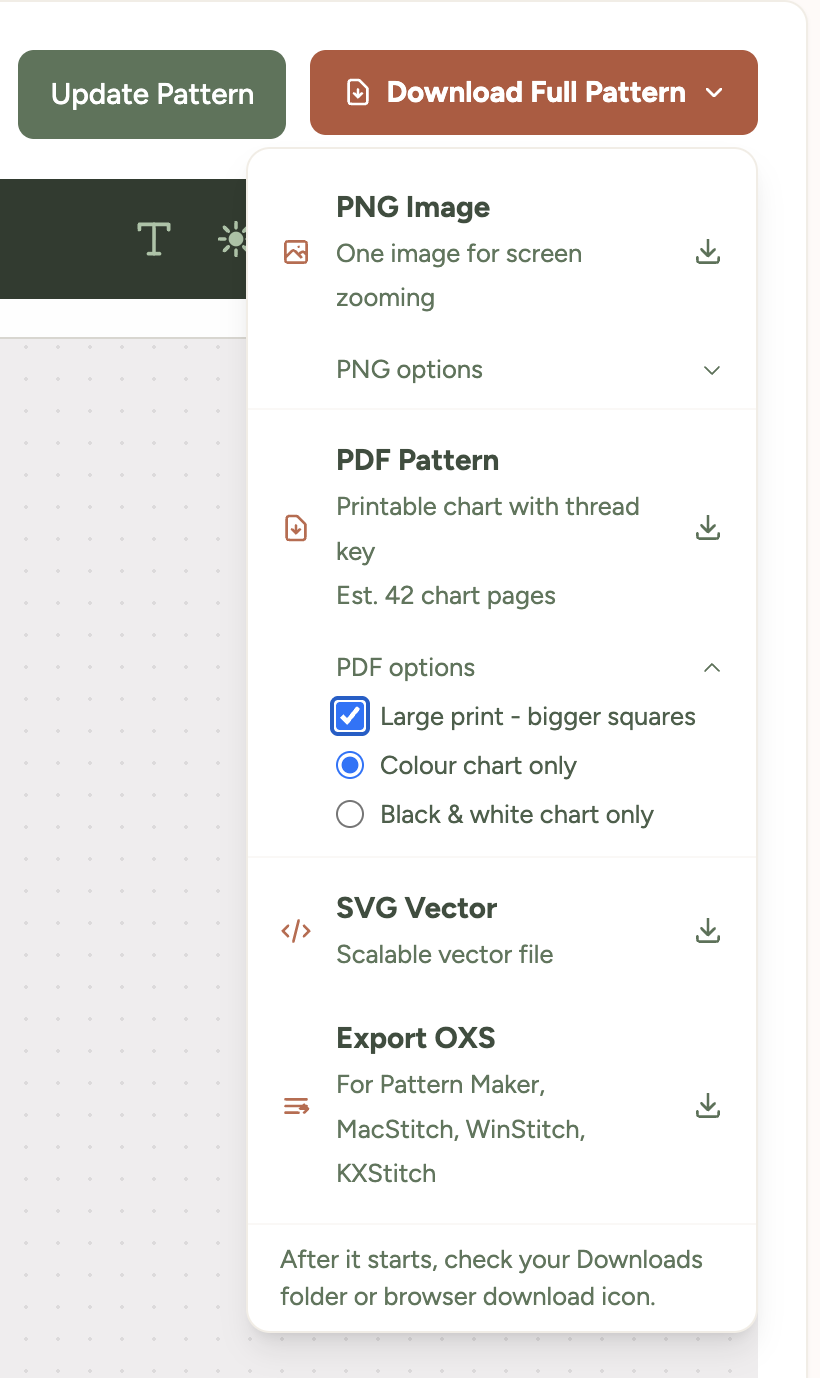
- Open your pattern and the Download Full Pattern menu.
- Tick Large print PDF, below the file format options.
- Choose a colour or black-and-white chart, then select PDF Pattern.
- Open the downloaded PDF and print it from your browser or PDF viewer.
The file name starts with large-print- so you can tell it apart from a standard PDF.
What changes on the page?
- The chart squares, grid numbers and text are larger.
- The thread colour list is larger too.
- The chart may cover more pages to give each square more room.
Print one page first to check that the squares are comfortable to read. Keep your printer's Pages per sheet setting at 1.
For paper sizes and printer settings, see Printing Patterns. If you cannot find the PDF, see Finding Your Downloads.
Using large print in Pattern Keeper
Large print can split a chart across more pages, so Pattern Keeper may ask extra questions when joining them. See Using Pattern Keeper for what to choose when it asks about shaded rows or columns.
Was this guide helpful?
Still need help?
Send us a message and we'll get back to you as soon as we can. You can also reply to any email from Xstitchify.