iPad, iPhone, Android and desktop
Cross Stitch App That Works on Every Device
Xstitchify is a cross stitch app for iPad, iPhone, Android and desktop - no App Store download, no APK, nothing to install. The full pattern maker, text generator, DMC colour chart and pattern library load straight into any browser. Sign in once and your saved patterns follow you to every device.
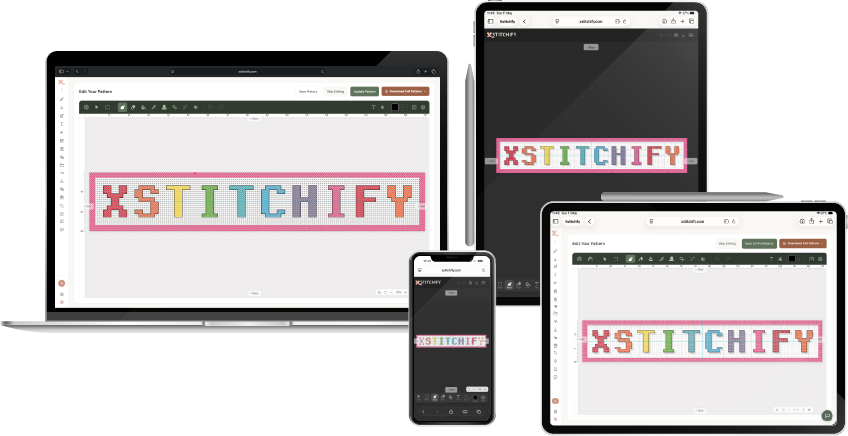
A browser-based cross stitch app
Most apps for cross stitch need an App Store or Google Play download and only run on the device you installed them on. Xstitchify takes the opposite approach - it is a cross stitch app that runs in your browser, so the same account, the same saved patterns and the same DMC colour data are available wherever you sign in.
Design from a photo, generate cross stitch text, build a QR code pattern, draw a chart from blank on the grid designer, then save the result to your pattern library - all from a phone, tablet or desktop browser.
Cross stitch app for iPad with Apple Pencil
As a cross stitch app for iPad, Xstitchify runs in Safari, Chrome, Firefox or Edge - no App Store download needed. The pattern maker, text generator and grid designer all work on the iPad screen with touch input, and Apple Pencil works for precise stitch placement on the counted grid.
The pressure brush uses Apple Pencil pressure data to vary stroke width as you draw, so you can write real cursive letters and freehand cross stitch lettering with the same thick-and-thin variation you get in drawing apps like Procreate. Both Apple Pencil 1st generation and 2nd generation work - any iPad that pairs with an Apple Pencil supports the pressure brush in Xstitchify.
The full DMC colour chart is browsable on iPad, so it doubles as a reference while you stitch. Your saved patterns sync automatically when you open Xstitchify on any other device - no AirDrop, no exports.
Cross stitch app for Android (and Samsung S Pen)
For Android phones and tablets, Xstitchify works as a cross stitch app for Android through Chrome, Firefox or Samsung Internet. There is no APK to side-load and no Google Play listing - the same web URL opens the same tools you would use on a laptop.
On Galaxy Tab S and Galaxy Note / S Ultra devices, the Samsung S Pen works with the pressure brush. The S Pen passes pressure data through to Chrome, so freehand cursive writing and tapered cross stitch line work behaves the same way as Apple Pencil on iPad. Tested setups include Galaxy Tab S7 / S8 / S9, Galaxy Tab S Ultra and Galaxy S22/S23/S24 Ultra phones with their bundled S Pen.
On Android tablets you get the full pattern editor; on Android phones the interface adapts so the pattern library, DMC colour lookup and pattern previews stay easy to browse on a smaller screen.
Cross stitch app for iPhone
On iPhone, Xstitchify runs in Safari or Chrome and adapts to phone screens. It is well-suited to mobile use cases that fit cross stitching well: looking up a DMC colour while at a craft shop, reviewing a chart while travelling, picking the next pattern from your library, or generating a quick cross stitch text design between full design sessions on a larger device.
Cross stitch app for Mac, Windows and Chromebook
Because Xstitchify is browser-based, the cross stitch app also runs on Mac, Windows and Chromebook with no install. That makes it a workable alternative to desktop-only software like PCStitch or MacStitch when you need to design on a laptop and review your chart on a tablet later in the day. See the comparisons against PCStitch, KG-Chart, Stitch Fiddle and other cross stitch software if you are choosing between options.
On Windows, Microsoft Surface Pen (and the Surface Slim Pen) works with the pressure brush in Chrome or Edge. On Mac, Windows or Linux desktop, Wacom tablets (Intuos, Cintiq, One series) also pass pressure data through Chrome and Edge - useful for stitchers who already design on Wacom hardware.
Pressure-sensitive stylus support on every device
One thing most cross stitch apps cannot do is respond to stylus pressure. Xstitchify can. The pressure brush reads pressure data straight from the browser and varies the width of each stroke as you draw - so writing cursive letters, tracing handwriting onto a counted grid and drawing tapered freehand lines all feel like proper pen-on-paper drawing, but one stitch at a time.
- Apple Pencil (1st and 2nd gen) on iPad - Safari, Chrome, Firefox or Edge
- Samsung S Pen on Galaxy Tab S / Note / S Ultra - Chrome on Android
- Microsoft Surface Pen and Surface Slim Pen - Chrome or Edge on Windows
- Wacom tablets (Intuos, Cintiq, One) - Chrome or Edge on Mac, Windows or Linux
- Mouse and trackpad still work for everything else - the brush just draws at a fixed width instead of varying it
See the pressure brush guide for setup notes, min/max stroke size and tips for writing cursive lettering onto the counted grid.
Why a web cross stitch app instead of a native one
- No install, no permissions, no storage prompts - the app loads the moment you open the URL.
- One account across devices - patterns saved on a laptop appear on iPad and Android automatically.
- Always up to date - no waiting for App Store approval, no nag screens to update.
- Works on locked-down devices - useful when you cannot install apps (work laptop, school Chromebook, shared family iPad).
- Same pattern library for life - patterns are tied to your account, not the device they were created on.
What you can do on each device
iPad and Android tablet
Full pattern editor with touch input, Apple Pencil and Samsung S Pen support. The pressure brush varies stroke width as you draw - ideal for cursive lettering and tapered freehand lines on a counted grid.
iPhone and Android phone
Look up DMC colours, browse your pattern library, review charts, generate quick cross stitch text. The interface scales to phone screens without losing the toolset.
Mac, Windows and Chromebook
The largest workspace for designing detailed patterns, importing OXS files and exporting print-ready PDF charts. Surface Pen and Wacom tablets also work with the pressure brush. Same login, same pattern library.
Cross stitch app FAQ
Is there a cross stitch app for iPad?
Yes - Xstitchify runs in Safari or any browser on iPad. No App Store download. Touch input and Apple Pencil both work on the counted grid.
Is there a cross stitch app for Android?
Yes - it works in Chrome, Firefox or Samsung Internet on Android phones and tablets. No APK to install.
Is there a cross stitch app for iPhone?
Yes - Xstitchify is mobile-friendly and the layout adapts to iPhone screens for browsing patterns, looking up DMC colours and reviewing charts.
Do I need to install a cross stitch app?
No. Xstitchify is browser-based - no App Store, no Google Play, no install. Everything is at xstitchify.com.
Can I use the cross stitch app on more than one device?
Yes. Sign in on each device and your pattern library, saved designs and DMC palette settings are all available. No manual file transfer.
Does the cross stitch app work with Apple Pencil and Samsung S Pen?
Yes. The pressure brush varies stroke width with how hard you press, so cursive lettering and freehand drawing feel natural. Apple Pencil (1st and 2nd gen) on iPad, Samsung S Pen on Galaxy Tab S / Note / Ultra, Microsoft Surface Pen on Windows and Wacom tablets on desktop all pass pressure data through the browser. See the pressure brush guide.
Is the cross stitch app free?
There is a free tier on every device with no install. Paid plans add more pattern generations, more library storage and additional tools.