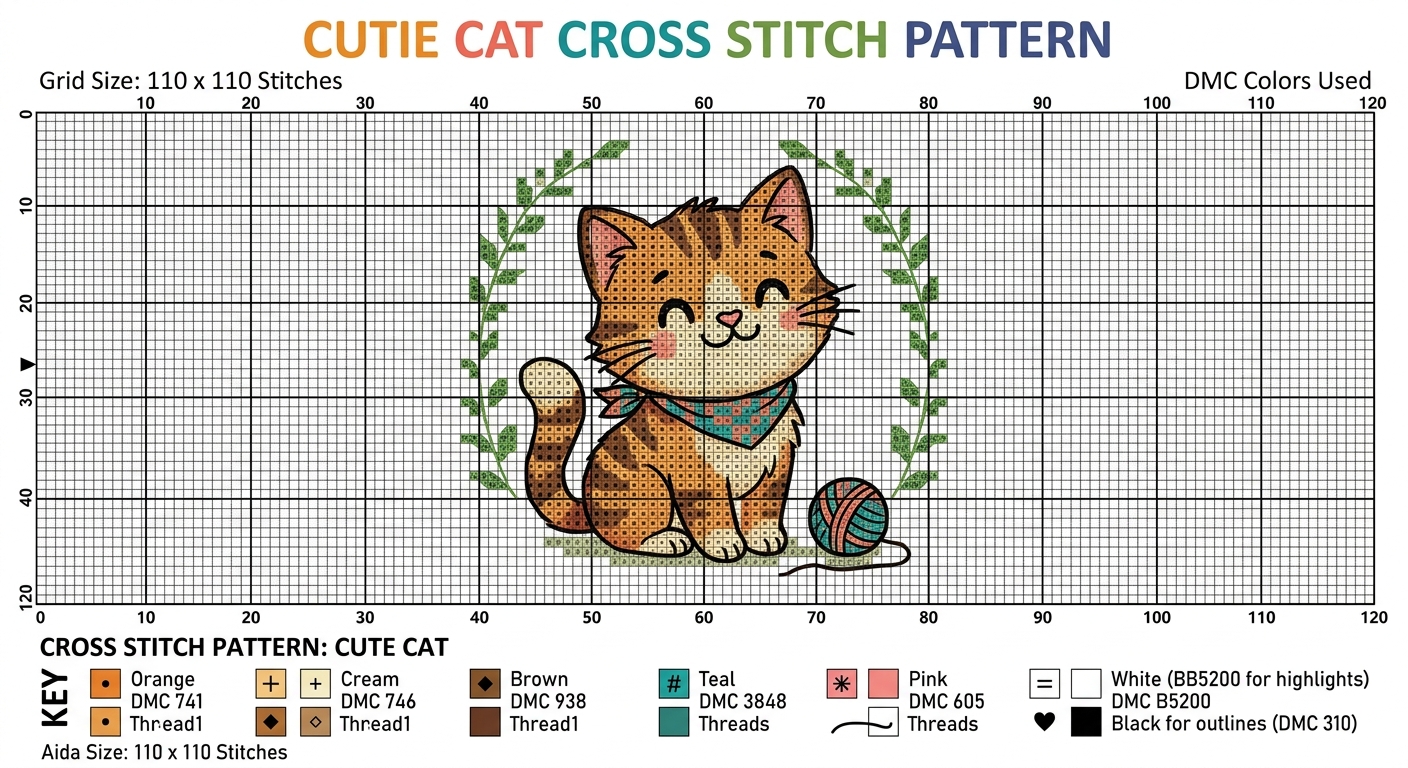
You can ask ChatGPT to make you a cross stitch pattern. It will give you something back. The question is whether what you get is actually a cross stitch pattern.
Short answer: no, not really. ChatGPT can produce a picture that looks like cross stitch, and it will confidently tell you DMC codes to match, but neither the picture nor the codes will survive contact with a real project. If you sit down with fabric, floss and hoop and try to stitch from what ChatGPT gave you, you’ll hit the wall inside about ten minutes.
That’s not ChatGPT being bad at its job. It’s ChatGPT being asked to do something outside its training - a cross stitch pattern isn’t a language task or an image task, it’s a specific data structure: a grid of discrete whole stitches mapped to real thread codes with a symbol key. Generative AI can approximate the look. It can’t produce the thing.
This post goes through what ChatGPT actually does when you ask it for a cross stitch pattern, what it can genuinely help with, and where you need something else in the loop. There’s a real example below - an AI-generated cat cross stitch chart, which is exactly the kind of prompt people send ChatGPT because cats are the most-searched-for cross stitch subject on the internet.
What ChatGPT produces when you ask for a cross stitch pattern
If you prompt ChatGPT (Plus, with image generation enabled) with something like “make me a cute cat cross stitch pattern with a ball of yarn and an autumn leaf wreath,” you’ll get back one of three things depending on which version you’re on:
1. A styled image. A picture of a cute cartoon cat playing with yarn inside an ivy wreath, rendered to look cross-stitched - visible pixel grid, slight texture, restrained palette. It looks plausible. It is not a chart.
2. A styled image plus a “key.” Sometimes ChatGPT appends a DMC key below the image: “DMC 741 Orange, DMC 746 Cream, DMC 938 Brown…” These look authoritative. Two problems: (a) the codes often don’t match the image accurately, because the model is generating plausible thread codes rather than extracting them from the image, and (b) some codes don’t exist at all. DMC 2047 isn’t a real floss; neither is DMC 1203. Any DMC code above around 3899 is suspect.
3. A pretend symbol chart. If you ask “can you also give me the chart?”, ChatGPT will produce something that looks like a symbol grid - letters or shapes in cells, a tidy key at the side, row and column numbers down the margins. It will look like a cross stitch pattern in the way that a dream of a cathedral looks like a cathedral.
None of this is ChatGPT being dishonest. It’s doing what generative AI does - producing plausible output in the style of the request. Cross stitch charts just happen to be a medium where the line between “plausible” and “correct” is unusually strict, because any single wrong symbol in the grid means a wrong stitch on your fabric.
A real example: the AI cat cross stitch chart
Here’s what an AI-generated “cat cross stitch pattern” actually looks like when you prompt ChatGPT for one. The image below is the real output of a prompt asking for a cute cat cross stitch chart with a yarn ball and wreath border:
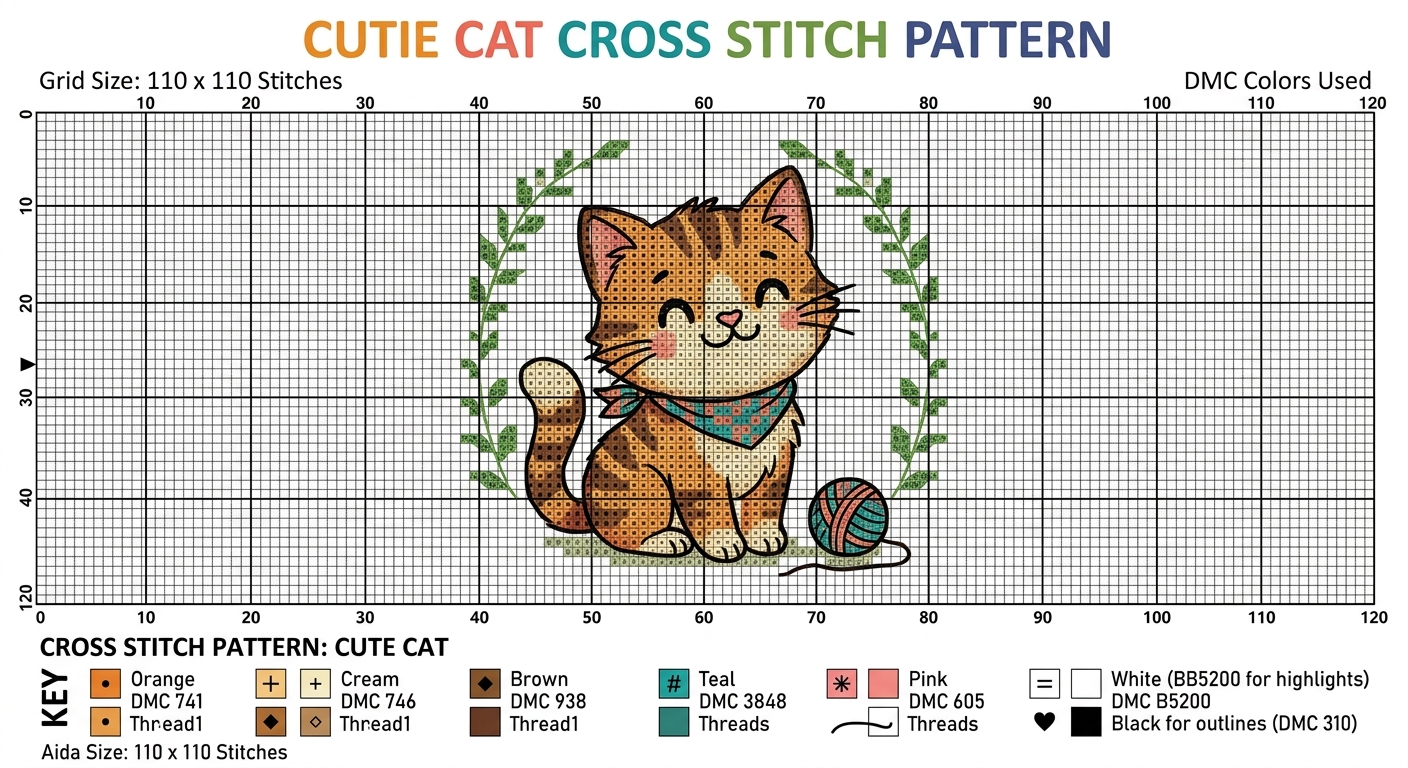
It looks the part. Grid numbers along the top and sides (0 to 120). A grid size stated (“110 x 110 stitches”). An aida size. A colour-coded key at the bottom listing “Orange DMC 741”, “Cream DMC 746”, “Brown DMC 938”, “Teal DMC 3848”, “Pink DMC 605”, “White”, and “Black for outlines (DMC 310)”. Symbols next to each colour. A title: “CUTIE CAT CROSS STITCH PATTERN”. If this turned up in an Etsy listing, a lot of stitchers would add it to cart.
It is entirely unstitchable. Here’s what’s actually wrong with it:
The image is not pixelated to the grid. Look at the cat. It’s drawn in smooth anti-aliased curves, not discrete whole stitches. There’s no way to count “how many orange stitches wide is the cat’s face” because the cat’s face isn’t made of stitches - it’s a JPEG of a cat with a grid overlaid on top. A real cross stitch chart has a 1:1 correspondence between grid cells and stitches. This has a cat, and separately has a grid.
Three colours are labelled “Thread1”. Look at the key: Orange, Cream and Brown all say “Thread1” underneath the DMC number. That’s an LLM filling in a template field with a placeholder value and nobody catching it. A real pattern key lists the actual colour name (DMC 741 is “Tangerine Medium”, not “Thread1”).
The white entry is hallucinated and layout-broken. The key shows “White (BB5200 for highlights)” with “DMC B5200” on the line below. BB5200 isn’t a real DMC code - the real DMC bright snow white is B5200, with one B. A human-made pattern key lists the colour code once, next to the colour name, and the code is real. This one has two codes, one fake and one real, floating next to the same colour across two lines with no clear relationship between them. The black entry below it is correct (DMC 310), which makes the muddled white entry stand out more, not less.
There is no symbol grid. A real cross stitch pattern has two pages: a picture preview (what you’re aiming for) and a symbol chart (what you actually stitch from). The symbol chart is a black-and-white grid with each cell showing a unique symbol that maps to one of the threads in the key. This file only has the preview. There’s no chart to stitch from at all, which is why the symbols in the bottom key (+, ×, hash, ≡, heart) don’t appear anywhere in the picture.
The “grid” is cosmetic. The light blue lines every 10 squares are painted on top of the image like a photograph with a ruler laid across it. They don’t correspond to stitch boundaries. Zoom in and the cat’s whiskers cross gridlines at diagonals - an impossibility in counted cross stitch, where every stitch sits inside exactly one cell.
Even the grid size doesn’t add up. “Grid Size: 110 x 110 stitches” in the header, “Aida Size: 110 x 110 stitches” in the key. But the grid numbering visible along the top goes 0 to 120, with the pattern content sitting somewhere inside that. You can’t tell where the 110x110 actually starts and ends.
You could stitch it, in the sense that you could sit down with fabric and try. But you’d be guessing where every single stitch goes because the pattern you’re stitching from is a picture of a cat, not a chart. By stitch 200 you’d have something that looked vaguely cat-shaped. By stitch 2000 you’d have abandoned the project. A real cute cat cross stitch pattern with a yarn ball and wreath border is the kind of thing that takes a designer an afternoon to chart properly, and a stitcher 30 to 50 hours to complete. An AI-generated version like this one saves the 30 minutes of charting and adds back 40 hours of frustration.
Why ChatGPT can’t output a real chart
It comes down to what a cross stitch chart actually is, as a data structure:
- A grid (say 110x110) where each cell holds exactly one of a small set of values - a colour index, a backstitch indicator, or empty.
- Each colour index points to a specific, real thread code - DMC 310, not “a dark warm grey”.
- Each colour has a unique symbol assigned so you can read the chart in black and white or at low contrast.
- Stitch counts per colour are derivable, finished size is derivable on a given fabric count, PDF export is deterministic.
Generative AI is extremely good at producing sentences and images that look right. It’s extremely bad at producing data that is right. A cross stitch chart is the second thing. When ChatGPT “generates a chart” for a cat, a dog, a robin or anything else, it’s actually generating an image that resembles a chart, which is a completely different task from generating the data that a chart actually is.
The same problem applies to every general-purpose AI model - Gemini, Claude, Grok, any of them. They can’t write a stitchable chart for the same reason they can’t write a working Excel file with correctly-calculated formulas from a prompt: image and text generation aren’t chart generation.
What ChatGPT actually can help with for cross stitch
The useful answer isn’t “ChatGPT is useless for cross stitch” - it’s “ChatGPT is useful for the parts of the workflow that are language or ideation tasks.” These are the things it genuinely helps with:
Brainstorming subjects and themes. “What would be a good cross stitch gift for my sister who loves cats and autumn?” - ChatGPT is great at this. It’s working in its native habitat. Cats, kittens, pet portraits, wildlife, seasonal scenes, baby animals - if you want twenty prompt ideas for a cute cross stitch pattern, ask ChatGPT and pick your favourite.
Refining a prompt before feeding it to a dedicated generator. ChatGPT is better at writing prompts for image models than most humans are. If you’re about to type into an AI cross stitch pattern generator, asking ChatGPT to write you a better prompt first often gets a cleaner output. “A cute tabby cat with green eyes playing with a ball of yarn, sitting inside a circular wreath of autumn leaves and ivy, folk art illustration style, simple flat colours” is a much better cross stitch prompt than “cat pattern”.
Generating a reference image you then convert separately. ChatGPT’s image generation (on Plus / Pro tiers) is visually great. The mistake is trying to use the output as a pattern. The right use is: get the cat picture you like, then run it through an actual photo-to-cross-stitch converter - which takes an image and produces a real chart with real thread codes. At that point you’ve broken the task into the two things AI is and isn’t good at.
Writing accompanying text. Dedication, blessing, quote, cat’s name, kitten’s birthdate in a specific style - language is ChatGPT’s strength. Get the words, then put them into a proper text generator so they come out as a real stitchable pattern.
Pattern advice and troubleshooting. “How do I reduce confetti stitches on a cat pattern?”, “what’s a sensible fabric count for a 110x110 kitten chart?”, “how long will a 200x200 pattern take at 180 stitches/hour” - ChatGPT is fine at these. Read the answers with a little skepticism (the 180 stitches/hour figure is confident; the underlying numbers vary), but it’s useful as a quick reference.
The two-step workflow that actually works
If you’re set on using ChatGPT for your cross stitch pattern - cat, dog, flower, landscape, anything - the workflow that produces stitchable output is:
- Generate a reference image with ChatGPT. Refine the prompt until you like what you see. Flat-colour styles (cartoon, folk, block-print) convert to cross stitch much better than photorealistic styles. For a cat or kitten pattern specifically, a folk-art or watercolour style with strong outlines converts far more cleanly than a detailed fur-rendered realistic style.
- Download that image.
- Upload it to a real chart generator. Either our photo-to-cross-stitch converter (free), or our AI pattern generator if you want to also let it regenerate with more control, or any other image-to-pattern tool.
- Open the output in a pattern editor. Clean up the bits the converter got wrong, swap thread colours that don’t look right, redo any text using an actual text tool (AI-rendered text in cross stitch always looks wobbly).
- Stitch-test a small area. Before committing 40 hours to your cat or pet portrait, stitch a 20x20 section on your fabric and see if the colour choices work in thread rather than on screen.
At the end you’ll have a real chart. ChatGPT got you the image; something else produced the stitchable data.
Or skip ChatGPT and do it in one tool
The one-step alternative, if you don’t specifically want to keep ChatGPT in the loop, is an AI cross stitch generator that bundles the steps. You give it a prompt; it generates the image, converts to a stitchable grid, matches real thread codes, runs confetti reduction and opens the editor. That’s what our AI pattern generator does - it’s built around the same two-step idea, just without you having to do the middle step. Cat, kitten, dog, robin, cottage, wedding sampler - if you can describe it, it chart it.
The choice between routes isn’t really about technical quality - both work. It’s about whether you want to keep using ChatGPT as your sketching tool because you already know and like it, or whether you’d rather skip the image-swapping and get a chart out in one go.
A few things to watch out for
Don’t buy AI “patterns” that originated in ChatGPT. If someone is selling you a “cross stitch pattern” they made by prompting ChatGPT for a chart, the file inside the PDF will look like the cat image above - a picture with a fake grid overlay and a hallucinated thread key. Look for the same red flags as in how to spot AI cross stitch patterns: no real chart preview, implausible thread codes, a finished-piece photo that’s too clean, a key that references “Thread1” or non-existent DMC codes.
Don’t trust ChatGPT’s thread code suggestions without checking. If it tells you to buy DMC 2047, it’s wrong. DMC codes go up to about 3899 in the numeric series, plus a handful of named variegated and overdyed colours. Cross-check any code you’re about to buy against a real DMC colour chart.
Don’t paste a ChatGPT chart image into a pattern printer and try to stitch. The image isn’t a chart. It’s a picture of a chart. The symbols don’t correspond to anything. Use it as inspiration; don’t use it as instructions.
The short version
ChatGPT is a good assistant for cross stitchers. It’s not a chart generator. The cross stitch patterns you can stitch from - cat, dog, kitten, pet portrait, seasonal scene, wedding sampler, anything - are produced by tools built specifically for that job, which use image generation (if they include it) as one step in a larger pipeline, not as the whole thing.
If you’ve been trying to get a real pattern out of ChatGPT and hitting walls, you’re not doing it wrong. You’re just using the wrong tool for this part of the workflow. Slot in a proper chart generator after the ChatGPT image and the whole thing starts to work. If you want to compare the options, we wrote up the best AI cross stitch pattern generators in 2026.