Cross stitch confetti stitches
Confetti stitches are the single biggest frustration in photo-to-pattern cross stitch. Here's what causes them, why they're worst at colour transitions, and how to clean them up.
Same photo. Same settings. Better result.
See the difference
Drag the slider to compare. Both patterns use 100 stitches wide with 20 colours.
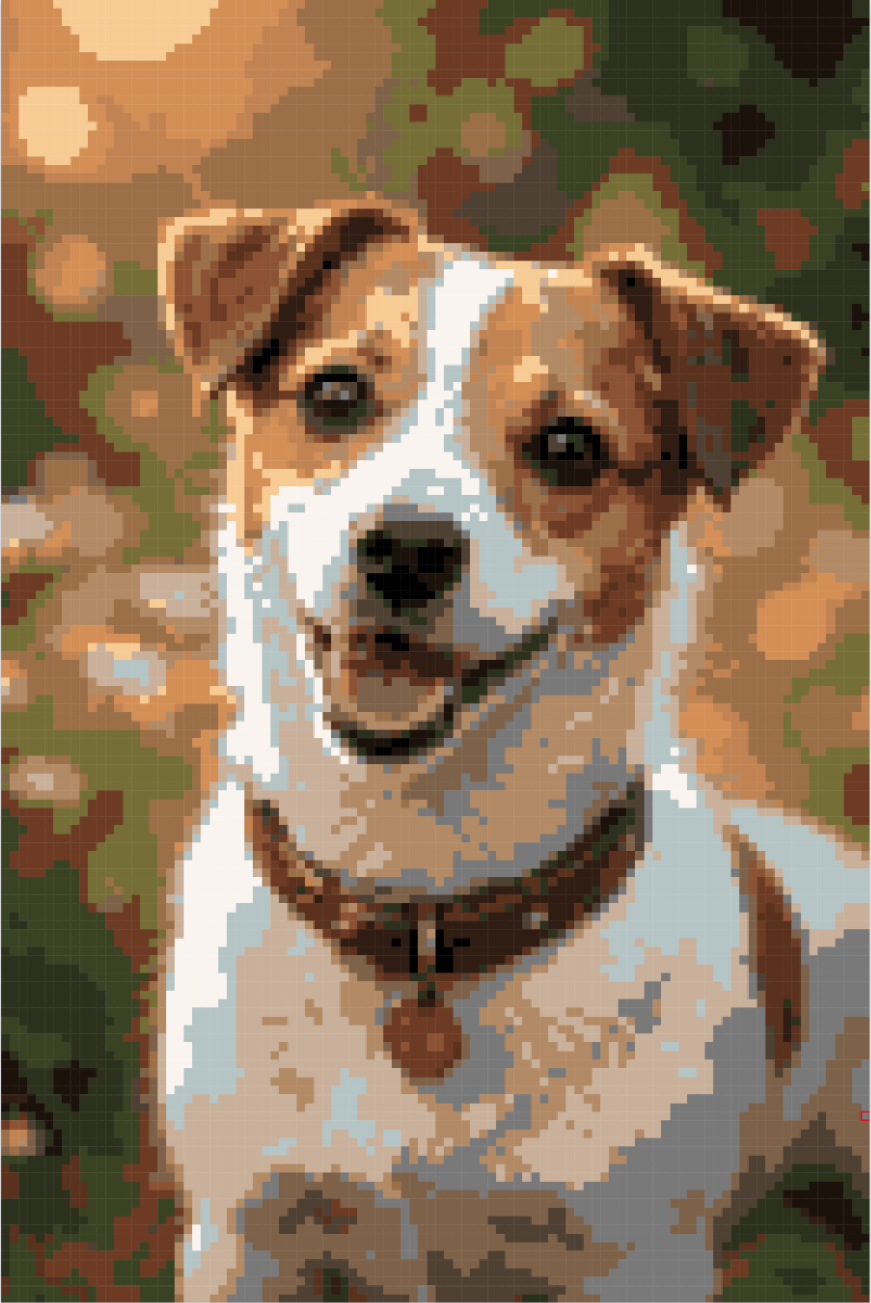
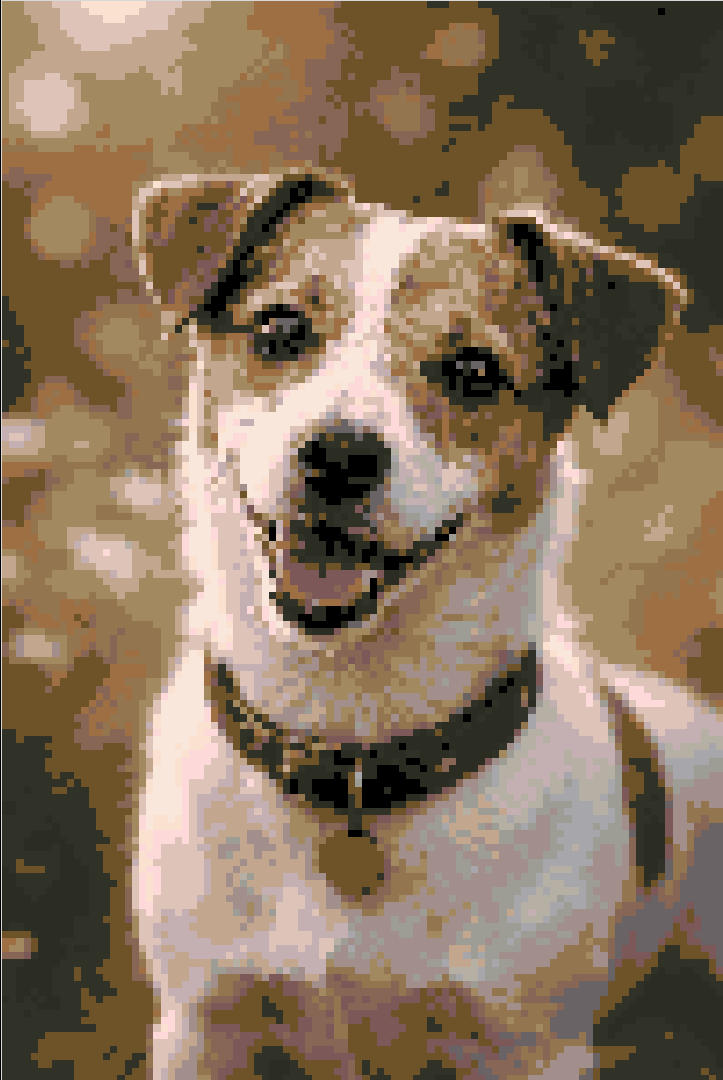
Left: a basic converter with no confetti handling. Right: the same photo converted with Xstitchify.
What is confetti in cross stitch?
Confetti stitches are isolated single stitches scattered across a cross stitch pattern, each in a different colour from its neighbours. They get their name because the pattern looks like someone threw a handful of confetti over it - tiny dots of colour everywhere with no structure.
Every confetti stitch means cutting your current thread, re-threading your needle with a new colour, anchoring it, making one or two stitches, then cutting again and switching to another colour. On a pattern with heavy confetti, you can spend more time managing thread changes than actually stitching.
A small amount of confetti is normal and sometimes necessary for detail. The problem is when confetti dominates the pattern - hundreds of isolated stitches that don't contribute much to the overall image but massively increase the time and frustration of completing it.
Signs your pattern has a confetti problem
-
Your thread list has 40+ colours but most are used for fewer than 20 stitches each
-
Zooming into any 10x10 area shows 8 or more different colours with no clear blocks
-
You're constantly parking needles or cutting thread after just one or two stitches
-
The back of your fabric is a thick mess of anchored threads with no clean rows
What causes confetti stitches?
Confetti is almost always a conversion problem, not a design problem. When you turn a photograph into a cross stitch pattern, every pixel gets mapped to the nearest DMC thread colour. A photo might have thousands of subtle colour variations - a shadow on a cheek, light reflecting off a petal, grain in a wooden table - and a basic converter faithfully turns each one into a different thread colour.
The worst confetti happens at transitions between colours. Where a dark area meets a light area in your photo, the pixels in between are shades of grey that don't cleanly belong to either colour. A basic converter maps each of those in-between pixels to whichever thread colour is mathematically closest, scattering them across the boundary. The result is a messy band of isolated stitches along every edge in the pattern.
Too many colours
Using 50+ DMC colours when 20 would capture the image just as well. Each extra colour adds more isolated stitches.
Colour transitions
Where two colours meet, the in-between pixels are neither one nor the other. These get scattered along every edge in the pattern.
Complex source photos
Photos with lots of texture, noise, or subtle gradients produce the worst confetti. Simple graphics convert much more cleanly.
Two stages, one clean pattern
How Xstitchify handles cross stitch confetti
Our algorithm does the heavy lifting automatically. Then the cleanup brush lets you make the judgement calls no algorithm can.
The algorithm
When you upload a photo, our converter doesn't just match each pixel to the nearest thread colour independently. It analyses each stitch alongside its eight neighbours, runs multiple smoothing passes, and merges isolated colours into surrounding blocks - all automatically.
The algorithm has been refined over many generations to find the right balance. It handles the vast majority of confetti stitches before you ever see the pattern.
But not all isolated stitches are noise. A single white stitch in a dark area might be the highlight in someone's eye that makes the whole face look alive. The transitions between colour areas are always shades of grey - sometimes you need them, sometimes you don't. No algorithm can tell the difference every time.
The cleanup brush
That's why we built the confetti cleanup brush. Brush over any area and isolated stitches get merged into their neighbours. You choose the strength and brush size, so you can be gentle in detailed areas and aggressive in backgrounds.
- ✓ Three strengths - Light, Medium, or Strong depending on how aggressively you want to merge
- ✓ Adjustable brush size - target a small area of detail or sweep across a whole background
- ✓ Clean whole pattern - one click to run the cleanup across every stitch at your chosen strength
- ✓ Works on imported patterns too - import an OXS, Pattern Maker .xsd or PCStitch .pat file and run the cleanup brush over it
pattern.xsd
Imported from Pattern Maker
342 confetti stitches found
After cleanup: 14 confetti stitches
Already have a messy pattern from other software?
If you have a pattern from Pattern Maker, MacStitch, WinStitch, KXStitch, or PCStitch that's full of confetti stitches, you can import it here and clean it up without starting over.
Upload your .oxs file, Pattern Maker .xsd file or PCStitch 7/8 .pat file and it opens straight in the browser editor. OXS, Pattern Maker XSD and PCStitch 7 preserve advanced stitch details; PCStitch 8 brings across the palette and full-stitch grid. Then use the confetti cleanup brush to clean up the messy areas, set your strength level, and export back to OXS if you want to continue working in another app.
Import a Pattern FileTips for reducing confetti when converting photos
Prevention is better than cleanup. These choices make the biggest difference.
Use fewer colours
15 to 25 DMC colours is enough for most photos. Going above 30 rarely adds visible detail but always adds confetti. Fewer colours means the converter groups similar shades together, creating clean stitchable blocks.
Use a smaller canvas
A 100-stitch-wide pattern has four times fewer pixels than a 200-stitch-wide one, which means four times fewer opportunities for confetti. 80 to 120 stitches wide is a good range for most projects.
Use a converter that handles it
Most basic converters map pixels independently with no smoothing. Xstitchify's algorithm analyses neighbouring stitches and merges isolated colours into clean blocks automatically. The cleanup brush then lets you fine-tune specific areas.
Start with a clean photo
Bright, well-lit photos with clear subjects convert better than dark, noisy ones. If your photo has a busy background, crop it first or use background removal to isolate the subject.
Ready to make cleaner patterns?
Upload a photo and see the difference our algorithm makes. Then use the cleanup brush to perfect it. Free to try, no account needed.
Confetti stitches FAQ
What is confetti in cross stitch?
Confetti stitches are isolated single stitches scattered across a pattern, each in a different colour from its neighbours. Every confetti stitch means cutting thread, re-threading your needle, and anchoring a new colour for just one or two stitches before switching again.
What causes confetti stitches?
Converting a photograph to a cross stitch pattern without enough colour reduction or smoothing. The worst confetti happens at transitions between colours, where the in-between pixels are shades of grey that don't cleanly belong to either colour. A basic converter scatters these along every edge in the pattern.
How do I reduce confetti stitches?
Use fewer colours (15 to 25 is usually enough) and keep your canvas size reasonable. Xstitchify's algorithm automatically analyses each stitch alongside its neighbours and merges isolated stitches into surrounding colour blocks. For any remaining confetti, the cleanup brush in the editor lets you target specific areas at three different strength levels while keeping detail where you need it.
Can I clean up confetti in a pattern I already have?
Yes. Import an .oxs file from Pattern Maker, MacStitch, WinStitch or KXStitch, a Pattern Maker .xsd file, or a PCStitch 7/8 .pat file, then use the confetti cleanup brush to target messy areas. Set the strength to Light, Medium, or Strong, choose your brush size, or hit "Clean whole pattern" to run it across everything. Export back to OXS when you're done.
Does confetti reduction lose detail?
Our algorithm is tuned to preserve important detail while removing noise. But confetti is inherently a grey area - what looks like noise in a sky might be essential detail in a face. That's exactly why we built the cleanup brush: the algorithm handles the obvious cases, then you decide what stays and what goes. You can be gentle in areas that need detail and aggressive in backgrounds.
How does the confetti stitch algorithm work?
The algorithm checks every stitch and counts how many of its eight neighbours share the same colour. If a stitch is isolated - surrounded by different colours - it gets merged into the most common neighbouring colour. This runs in multiple passes so clusters of confetti are smoothed out progressively, creating larger clean blocks while keeping the overall shape and detail of the design.